Port Finder
Which switch port this machine is plugged into, read from the switch itself.
You are in a rack room with an unlabelled patch lead and need the port before you can do anything else.
Needs Npcap
CySecTek
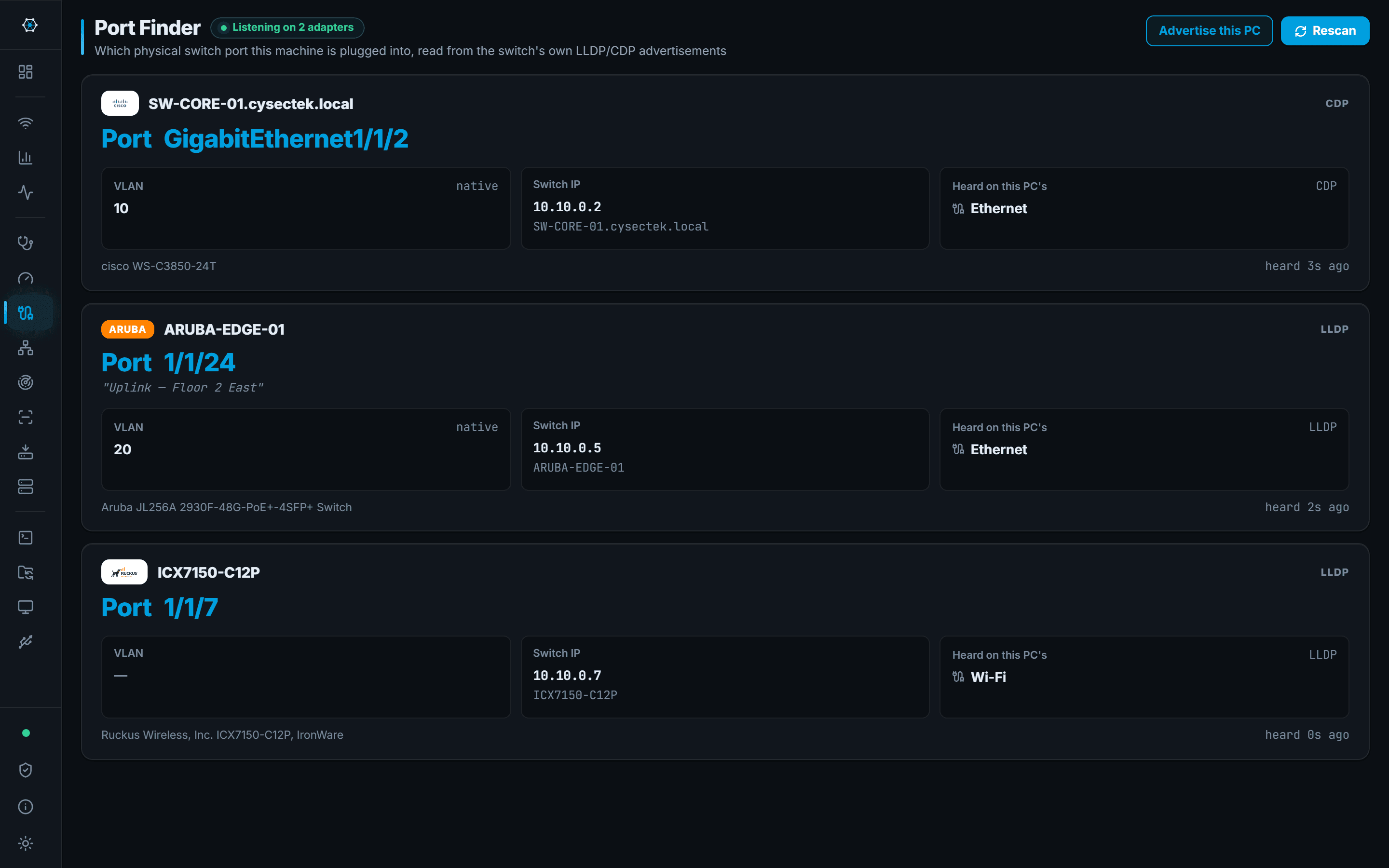
Port Finder listens for the LLDP and CDP frames switches broadcast on their own. When one arrives it reports the switch name, the physical port, the port description the switch administrator wrote, the native VLAN and the switch's management IP — for every adapter on the machine at once, so a laptop on both Ethernet and Wi-Fi shows both.
Nothing is sent to the switch to make this happen. The frames are already on the wire; the app reads them. It can also advertise this PC over LLDP, which is what you want when the question is being asked from the other end.
What you walk away with
- The switch name and port for the lead you are holding
- Native VLAN and the port description the network team wrote
- The switch's management IP, ready to SSH into
- Both wired and wireless neighbours at the same time
Where it stops
Stated here rather than discovered on site.
- Needs Npcap, because LLDP and CDP frames are not visible to an ordinary socket.
- Only reports what the switch advertises. A switch with LLDP and CDP disabled says nothing, and that is not a fault the app can work around.
- Frames arrive on the switch's own timer — typically every 30 to 60 seconds — so a fresh connection can take that long to appear.